
XP777 Game Download (Amazing New Online Earning Game) 2026
Justnow
7.8MB
v2.3
Android or iOS
20K+
Description
Introduction

XP777 Game APK is an Android gaming application that offers multiple online game categories in one place. It has gained attention among mobile users because of its simple interface, lightweight design, and compatibility with many Android devices. Before downloading any APK, it is important to understand its features, system requirements, installation process, and safety considerations. This guide provides a complete overview of XP777 Game APK in simple English.
Table of Contents
What is XP777 Game APK?
XP777 Game APK is an Android application that provides access to various online games through a single platform. Users can create an account, explore available game categories, and manage their profile from within the app.
Like many APK-based applications, features and availability may change with updates. Users should always review the app’s terms, privacy policy, and permissions before installing it.
Why Mobile Gaming Apps Are Popular
Mobile gaming has become popular because smartphones allow people to play games anytime and anywhere. Most gaming apps are easy to install and provide a convenient experience without requiring expensive hardware.
Some reasons for their popularity include:
- Easy to access on Android devices
- Simple installation process
- Regular feature updates
- Lightweight performance
- Wide variety of game categories
- User-friendly interfaces
Top Key Features of XP777 Game APK
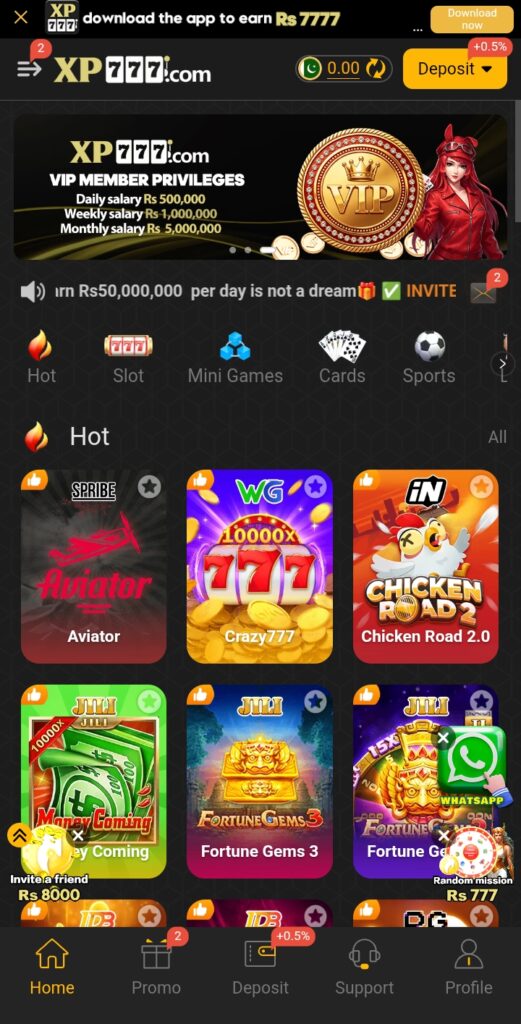
Simple User Interface of XP777 App
The application uses a clean and organized layout that makes navigation simple for both new and experienced users.
Benefits include:
- Easy-to-read menus
- Quick navigation
- Beginner-friendly design
- Fast access to features
Diverse Game Library
Instead of focusing on a single game, the app includes different categories that users can explore.
Depending on the version, available games may include:
- Card-based games
- Casual games
- Number-based games
- Mini games
- Time-limited events
The available content may vary after updates.
Fast Loading Speeds
The application is designed to load quickly on most supported Android devices.
Features include:
- Quick startup
- Smooth navigation
- Faster screen loading
- Optimized performance
Performance may still depend on your internet connection and phone specifications.
Advanced Security in XP777 APP
Most modern applications include basic account protection features.
These may include:
- Password protection
- Login verification
- Secure account management
- Privacy controls
Users should always create a strong password and never share their login information.
Regular Updates
Updates help improve stability and may introduce new features.
Regular updates often provide:
- Bug fixes
- Performance improvements
- Better compatibility
- Interface enhancements
Installing the latest version can improve the overall experience.
Universal Device Compatibility
XP777 Game APK is designed to work on many Android smartphones and tablets.
The app generally performs well on:
- Entry-level Android devices
- Mid-range smartphones
- High-end Android phones
Compatibility depends on your Android version and available storage.
System Requirements for Smooth Play
Before installing the application, make sure your device meets the basic requirements.
Recommended requirements:
- Android 7.0 or later
- Stable internet connection
- At least 2 GB RAM
- 200 MB or more free storage
- Updated Android operating system
Meeting these requirements can help improve performance.
How to Download XP777 Game APK
Follow these general steps to install the application safely:
- Download the APK from a trusted source.
- Allow installation from unknown sources if required by your device.
- Open the downloaded APK file.
- Tap Install.
- Wait for the installation to finish.
- Open the application.
- Complete the initial setup.
Always verify the source before installing any APK file.
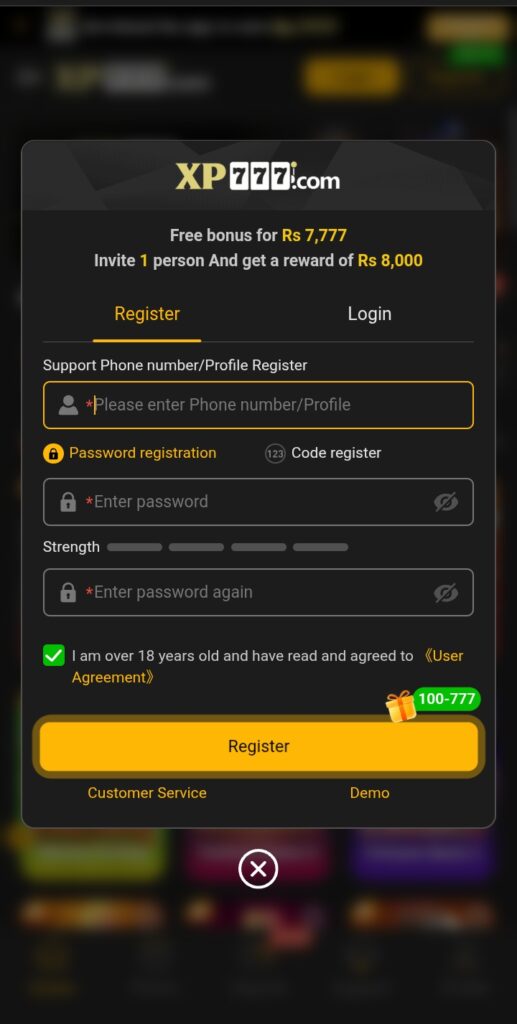
XP777 Game Login or Registration Process
Creating an account is usually straightforward.
- Open the application.
- Tap Register.
- Enter the required information.
- Create a strong password.
- Verify your account if necessary.
- Accept the terms and conditions.
- Tap Submit.
- Log in using your account credentials.
Keep your login details private to protect your account.
XP777 Game App Deposit and Withdrawal Process
If the application supports financial transactions, users should first review its payment policies and applicable terms.
Adding Money
Some versions of the app may allow users to add funds through supported payment methods. Before making any transaction:
- Check the supported payment options.
- Read any applicable fees.
- Confirm minimum transaction limits.
- Verify your account if required.
Withdrawal Process
If withdrawals are available, users should:
- Ensure their account meets the platform’s requirements.
- Verify identity if requested.
- Review minimum withdrawal limits.
- Check estimated processing times.
Policies may change over time, so always refer to the latest information within the app.
XP777 Game QR Code Deposit Process
XP777 Game may offer a QR code payment option for users who want to recharge their gaming accounts. If this option is available, follow these general steps to complete the payment.
- Log In to XP777 Game: Open the app and sign in using your registered account.
- Open the Deposit Section: Navigate to the Wallet, Recharge, or Deposit page.
- Select QR Code Payment: Choose the QR code option from the available payment methods.
- Enter the Amount: Add the amount you want to deposit into your account.
- Generate QR Code: Follow the instructions to display the payment QR code.
- Open Your Payment App: Launch your supported banking or mobile wallet application.
- Scan the QR Code: Scan the displayed code and carefully verify the recipient’s details.
- Confirm Payment: Check the payment amount and recipient before authorizing the transaction.
- Check Your Balance: Return to XP777 Game and check whether your wallet balance has been updated.
User Experience
Many users appreciate applications that are easy to navigate and responsive on Android devices. A clean interface, quick loading times, and regular updates can improve the overall experience.
However, performance may vary depending on:
- Internet speed
- Device hardware
- Available storage
- App version
Keeping the application updated and closing unnecessary background apps can help maintain smooth performance.
Safety and Privacy Tips
Protecting your personal information is important whenever you use an online application.
Use Official Links Only
Download the APK from trusted sources to reduce the risk of installing modified or unsafe files.
Set a Strong Password
Create a password that includes uppercase letters, lowercase letters, numbers, and symbols. Avoid using the same password on multiple websites.
Update the App
Install updates whenever they become available to receive the latest security improvements and bug fixes.
Common Issues and Solutions
App Not Installing
Possible solutions:
- Check Android compatibility.
- Free up storage space.
- Download the APK again if the file is incomplete.
App Crashing
Try these steps:
- Restart your phone.
- Update the application.
- Clear the app cache.
- Reinstall the latest version if necessary.
Slow Performance
Performance issues may improve if you:
- Close background applications.
- Restart your device.
- Use a stable internet connection.
- Keep sufficient storage available.
Login Problems
If you cannot log in:
- Double-check your username and password.
- Reset your password if needed.
- Ensure you have a stable internet connection.
- Contact the platform’s official support if the issue continues.
Conclusion
XP777 Game APK is an Android gaming application that offers multiple game categories through a simple and user-friendly interface. Its lightweight design, regular updates, and compatibility with many Android devices make it accessible to a wide range of users. Before installing any APK, download it only from trusted sources, review its permissions and policies, and keep your account secure with a strong password. Taking these precautions can help you have a safer and smoother experience.
Frequently Asked Questions (FAQs)
What is XP 777 Game APK?
XP 777 Game APK is an Android application that provides access to multiple online game categories through a single platform.
Is XP 777 Game available for Android?
Yes. It is designed primarily for Android devices.
How do I download XP 777 Game APK?
Download the APK from a trusted source, install it on your Android device, and complete the setup process.
Is XP777 Game safe?
Safety depends on where you download it from and how you protect your account. Always use trusted sources and strong passwords.
What are the minimum system requirements?
An Android device with Android 7.0 or later, sufficient storage, and a stable internet connection is generally recommended.
How do I update the app?
Download the latest version from the same trusted source you originally used or follow the app’s official update instructions.
What should I do if the app is not working?
Restart your device, clear the app cache, update the application, and check your internet connection. If the issue continues, contact the app’s official support.
Download links
How to install XP777 Game Download (Amazing New Online Earning Game) 2026 APK?
1. Tap the downloaded XP777 Game Download (Amazing New Online Earning Game) 2026 APK file.
2. Touch install.
3. Follow the steps on the screen.
Related apps








Latest Apps
-
New
 FUNUP 777 Game Download – Real Earning App in Pakistan 2026V1.0 5.6MB
-
UpdatedXP777 Game Download (Amazing New Online Earning Game) 2026v2.3 7.8MB
-
UpdatedC222 Game Best Game In Pakistan For Android Usersv2.0 4MB
-
Updated786Ace Game APK (Updated Version) Free For Android 2026V2.1 13MB
-
NewHF786 Game APK Download Latest Version For Android 2026V3.2 13MB
-
Most viewed apps
-
UpdatedY333 Game Best Earning App Download for Android & iOSv2.3 7.9MB
-
UpdatedSix177 Game Download APK – Best Earning Game in Pakistanv1.0.0 6.7 MB
-
UpdatedY888 Game Download 2026 – Real or Fake in Pakistan?V1.0 10MB
-
UpdatedHQ177 Game Updated Best Version Available For Android Usersv2.3 7.9MB
-
BBA566 Game Download (Best Real Money APP) in PakistanV3.2 14MB
-


